



Hitachi UX Technical Manual - Technical manuals and downloads for Hitachi UX and UX2
Download matching documents & software for Hitachi UX and UX2 series
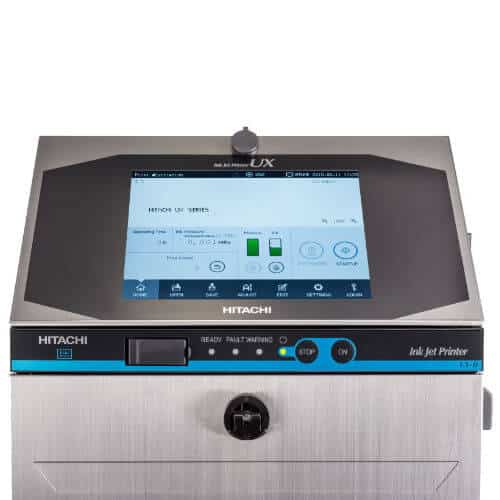
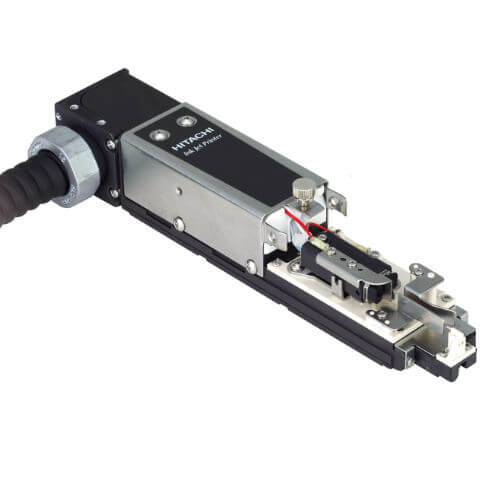
Both the Continuous Inkjet Hitachi UX as well as the Continuous Inkjet Hitachi UX2 stand for precise marking in industrial production - reliable, durable and user-friendly. Even when used in demanding production environments, these industrial printers are ready for Industry 4.0 with their speed and quality.
Here you will find comprehensive technical documentation such as Hitachi Inkjet Printer UX Manuals and the latest firmware versions. Everything you need to get the most out of your devices.
Hitachi UX Technical Manual - All downloads at a glance
For professional use, you will find the most important documents for the Hitachi UX2 and UX series here - including support documents for various models.
Hitachi UX and UX2 series
UX2 series
Brochure Hitachi UX2 Series German ⮟ Download
Brochure Hitachi UX2 Series English ⮟ Download
UX series
Brochure Hitachi UX Series German ⮟ Download
Brochure Hitachi UX Series English ⮟ Download
Accessories for all Hitachi CIJ printers
Accessories Hitachi CIJ German ⮟ Download
Accessories Hitachi CIJ English ⮟ Download
UX2 series
UX2 Basic Guide - English ⮟ Download
UX2 Basic Operational Manual - German ⮟ Download
UX series
Instruction Manual UX-B/D/E - German ⮟ Download
Instruction Manual UX-B/D/E - English ⮟ Download
Instruction Manual UX-D860 Twin - English ⮟ Download
Instruction Manual UX-P - English ⮟ Download
Instruction Manual UX-H - English ⮟ Download
Hitachi UX and UX2 series user reports
See how companies from different industries have successfully integrated the Hitachi Inkjet Printer UX series into their production processes. The following practical examples show how reliably and efficiently the systems work on a daily basis - whether in food production or beverage filling.
- User report from Herbsthäuser Brewery: Labeling with Hitachi high-speed inkjet printer from Diagraph
- User report from the DMK Group in EdewechtGrated cheese packaging with high-speed continuous inkjet printer
Be inspired by real applications and discover the advantages of modern marking technology in practical use.
Hitachi Inkjet Printer UX Manual - For reliable production
The Hitachi UX Technical Manual and the supplementary instructions are the key to safe and efficient use of your inkjet printing systems. Whether you are using the Continuous Inkjet Hitachi UX or the Continuous Inkjet Hitachi UX2 you will find all relevant information in one place: from commissioning and daily operation to maintenance and troubleshooting.
The Hitachi UX manuals help you to exploit the full potential of your printing system - for stable production processes, precise marking and minimal downtime. Thanks to a clear structure, technical details and practical tips, getting started is just as easy as professional operation.
Find out more about the Hitachi UX series
The Hitachi UX series is specially designed for industrial applications with high demands on flexibility and reliability. It is ideal for a wide range of industries - from the food and beverage industry to the cosmetics and pharmaceutical industries.

Advantages at a glance
The Hitachi UX series combines advanced inkjet technology with industrial-strength robustness - ideal for demanding production environments:
It is operated via an intuitive touch display with clearly structured and user-friendly menu navigation - ideal even for inexperienced users.
Thanks to the modular design, the devices can be quickly adapted to different requirements and flexibly expanded as needed.
Efficient ink consumption in combination with long maintenance intervals ensures particularly economical and cost-efficient use.
The printers are network-compatible and can be easily integrated into existing control and IT systems thanks to a wide range of interfaces
Request a free consultation now
We are here for you.

Competent contact persons

Response within 48 hours

Non-binding inquiry
Contact us directly via our contact form or use the contact details below during our business hours.
Tel.: +49 (0)931 25076 0
Tel.: +34 937 376 264
Fax: +49 (0)931 25076 50
Email: info@diagraph.de
Business hours
Monday - Thursday: 8:00 - 17:00
Friday : 8:00 - 14:00